Connect cTrader
Authorise read-only access once. cTrader then reports your order and position history to TradeMirror from its own servers, so recording continues while your computer is off.
About 3 minutes, once.
What gets recorded
- + Every position opened, closed and partially closed
- + Every stop-loss and take-profit modification, with the broker's own timestamp
- + Pending orders, amendments and cancellations
- + Size increases and scale-ins
What it cannot see
- – Anything that happened before you authorised the account
- – Levels you only dragged on a chart without submitting to the broker
Step by step
0 of 4 done
1.Add the account in TradeMirror
Go to Connections, choose Add account, give it a label, pick cTrader, and say whether it is live, demo or a prop-firm account.
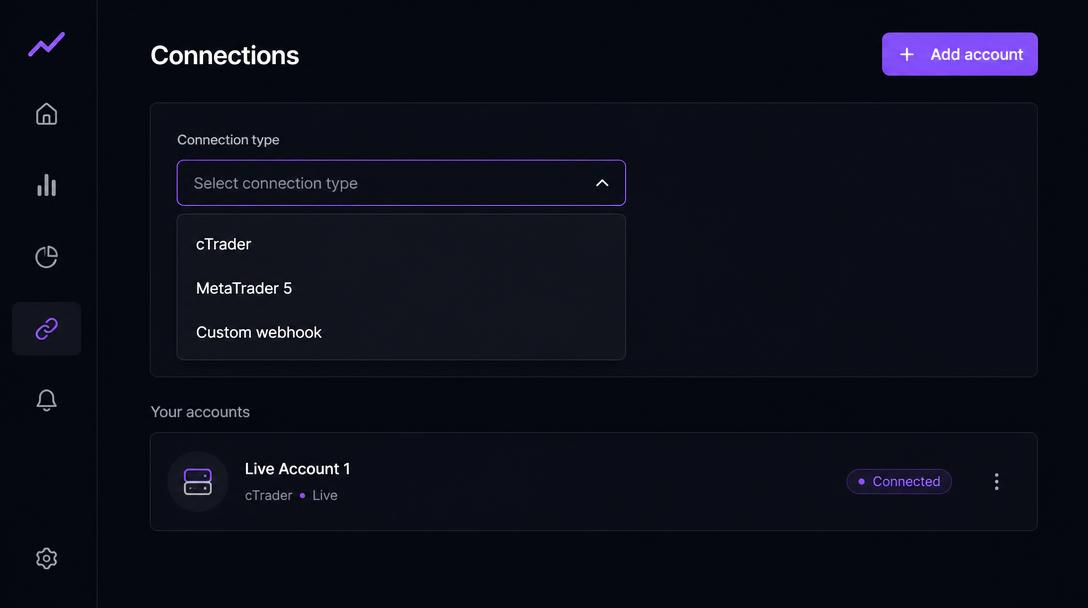
Worked if: The new account appears in your list with a Set up button.
2.Open the setup panel and authorise
Press Set up on the new account, choose the cTrader tab, then Authorise cTrader account. You are sent to cTrader's own consent screen. TradeMirror requests read access only — it cannot place, modify or close an order.
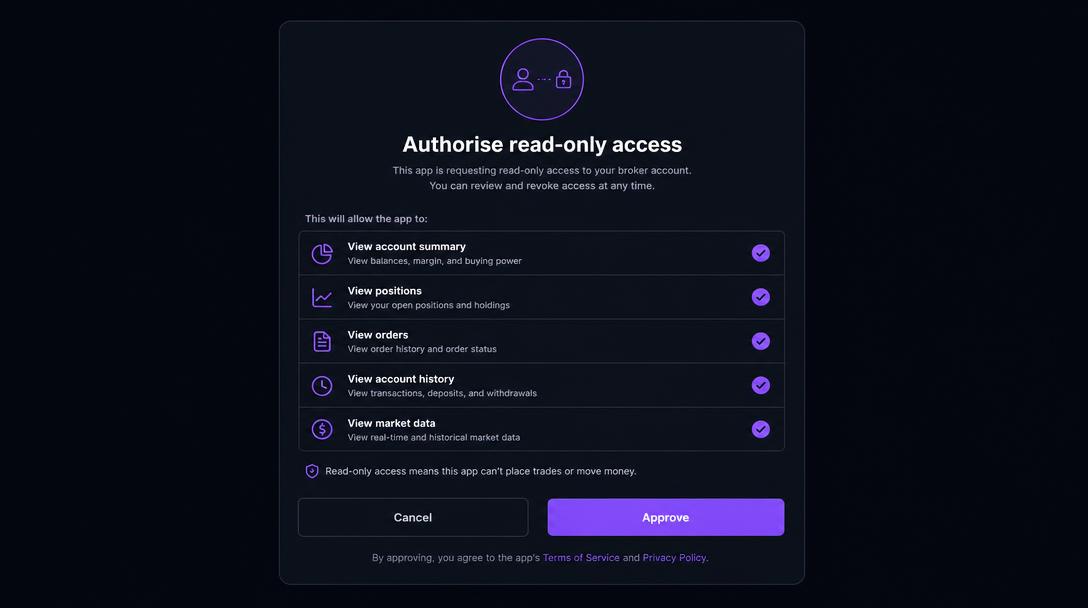
Worked if: You are returned to TradeMirror and the button now reads Re-authorise cTrader.
3.Choose which trading account feeds the record
Your cTrader ID may cover several trading accounts. After authorising you will see the accounts you granted, each marked live or demo. Select the one this TradeMirror account represents.
Worked if: The selected account is highlighted and a Sync now button appears.
4.Let the first sync run
History is pulled immediately, then re-polled automatically every 10 minutes. The Connections page shows the last sync time and how many events have been recorded.
Worked if: The connection check below turns green and the event count stops being zero.
Test this connection
Sign in and open this walkthrough from an account on the Connections page to watch data arrive in real time.
What a recorded trade looks like
Once the connection is live, a managed trade arrives as a sequence like this. The middle two rows are the point of the platform: without them there is a result but no record of how it was managed.
- 09:31:04Position openedLong 1.0 EURUSD at 1.0850, stop 1.0820, target 1.0930.
- 09:41:22Stop movedStop raised from 1.0820 to 1.0850 — recorded as a stop_modified event, not inferred.
- 10:02:47Partial close0.5 closed at 1.0889; 0.5 still open. Both the size before and after are stored.
- 10:26:10Position closedRemaining 0.5 closed at 1.0902, short of the 1.0930 target.
This is an illustrative example, not your data and not a suggestion about how to manage a position.
If something goes wrong
The button says cTrader is not configured.
The cTrader Open API application credentials have not been added to this deployment yet, so the Authorise button is disabled. This is set up once by the account owner at openapi.ctrader.com: register an application, request the accounts scope, register https://trademirror.pro/api/public/oauth/ctrader as the redirect URI, and store the Client ID and Secret. Nothing is wrong with your trading account, and MetaTrader or the custom webhook record everything in the meantime.
cTrader says the redirect URI does not match.
The URI registered in the Open API application must be exactly https://trademirror.pro/api/public/oauth/ctrader, with no www and no trailing slash. Add it, save, and try again.
It says the account needs re-authorising.
cTrader access tokens expire. Open the cTrader tab and press Re-authorise. No data is lost while it is disconnected — only the period with no connection is missing, and it is labelled as a gap.
Platform disclaimer
TradeMirror is a trade-recording, behavioural analytics and educational self-review tool. It does not provide investment advice, personal recommendations, trading signals, portfolio management or trade execution. Insights are based on historical activity and hypothetical scenarios and should not be treated as recommendations to buy, sell, hold or modify any financial instrument. Trading involves substantial risk. Past performance and simulated results do not guarantee future outcomes.
TradeMirror never places, modifies or closes an order. Every connection above is read-only.