Connect MetaTrader 5
Install the TradeMirror recorder on one chart. It reacts the instant your terminal accepts a change, so stop moves and partial closes are recorded as decisions, not reconstructed from history afterwards.
About 6 minutes, once.
What gets recorded
- + Every position opened, closed, reduced and increased
- + Every stop-loss and take-profit change, including chart drags, within milliseconds
- + Pending order placement, modification and cancellation
- + A heartbeat every 30 seconds proving the recorder is alive
What it cannot see
- – Anything that happens while the terminal is closed or the recorder is detached
- – Anything that happened before you installed the recorder
Step by step
0 of 7 done
1.Add the account in TradeMirror
Connections → Add account → MetaTrader 5. The recorder is generated for this account with its own ingest token inside, so do not share the file.
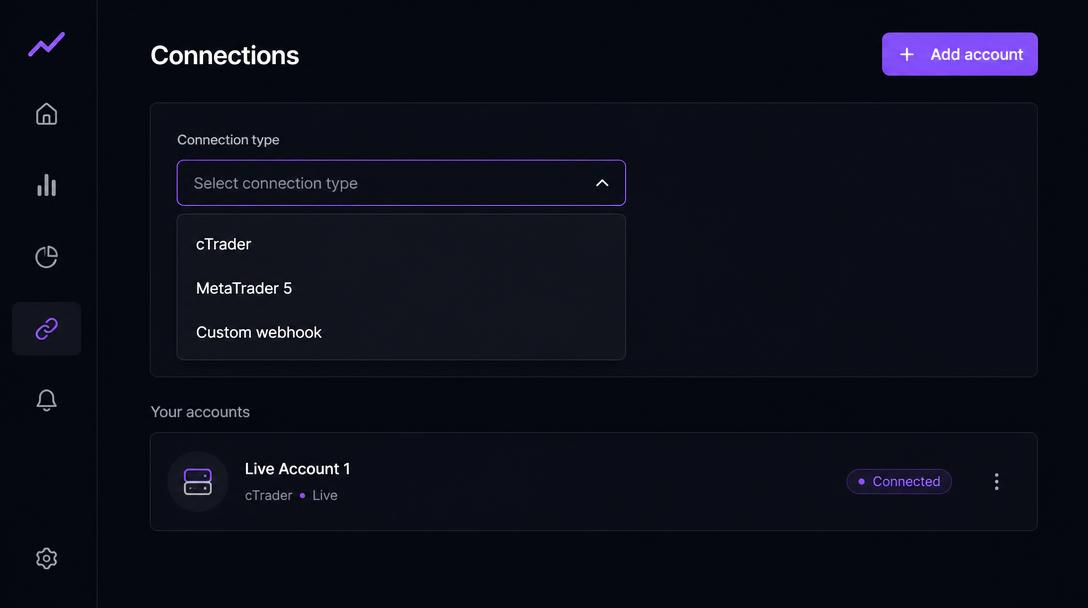
Worked if: The new account appears in your list with a Set up button.
2.Download the recorder
In the setup panel, MetaTrader tab, press MetaTrader 5 (.mq5).
Direct download link
https://trademirror.pro/api/public/ea/YOUR_TOKEN?build=mq5Worked if: A file named TradeMirror.mq5 is in your downloads.
3.Put it in your terminal's data folder
In MetaTrader: File → Open Data Folder → MQL5 → Experts. Copy the .mq5 file in there.
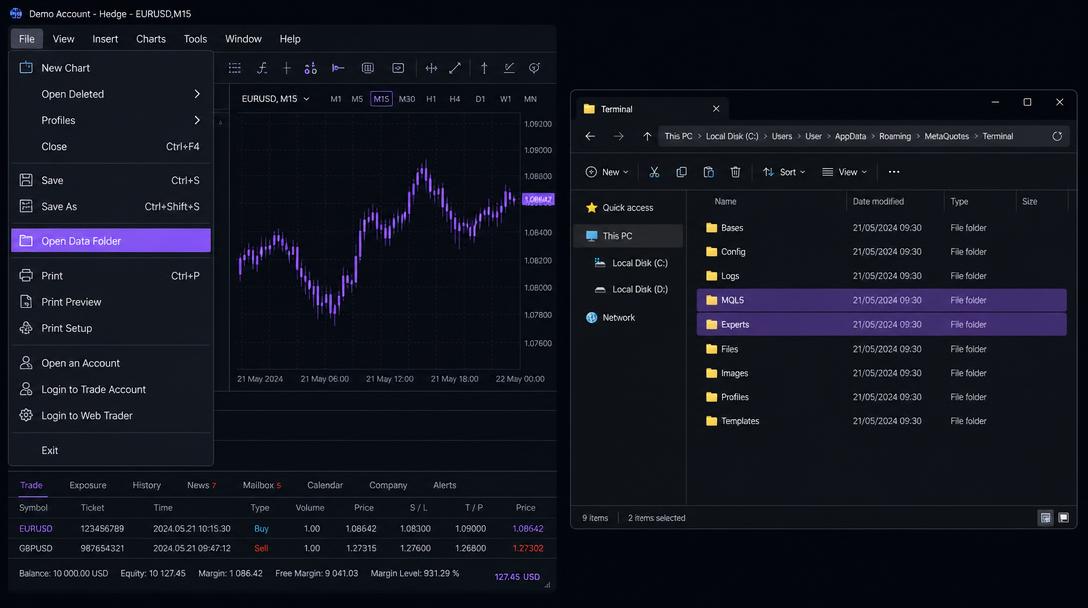
Worked if: The file sits alongside the other .mq5 files in MQL5/Experts.
4.Compile it
Open the file in MetaEditor (right-click → Modify) and press F7. It should compile with 0 errors.
Worked if: MetaEditor's Errors tab shows 0 errors, 0 warnings.
5.Allow TradeMirror as a web address
In the terminal: Tools → Options → Expert Advisors. Tick 'Allow WebRequest for listed URL' and add the address below exactly, with no trailing slash. Without this the recorder cannot report anything.
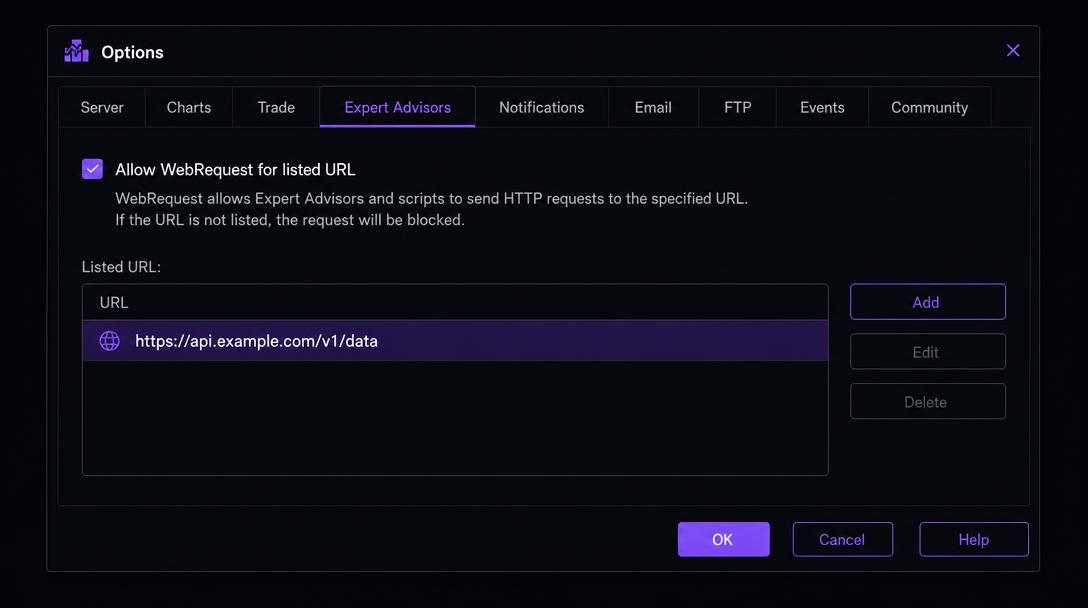
URL to add to the allowed list
https://trademirror.proWorked if: The address is listed in the box and the checkbox is ticked.
6.Attach it to one chart
Refresh the Navigator, drag TradeMirror onto any chart, and make sure Algo Trading is enabled. One chart records the whole account — do not attach it to several.
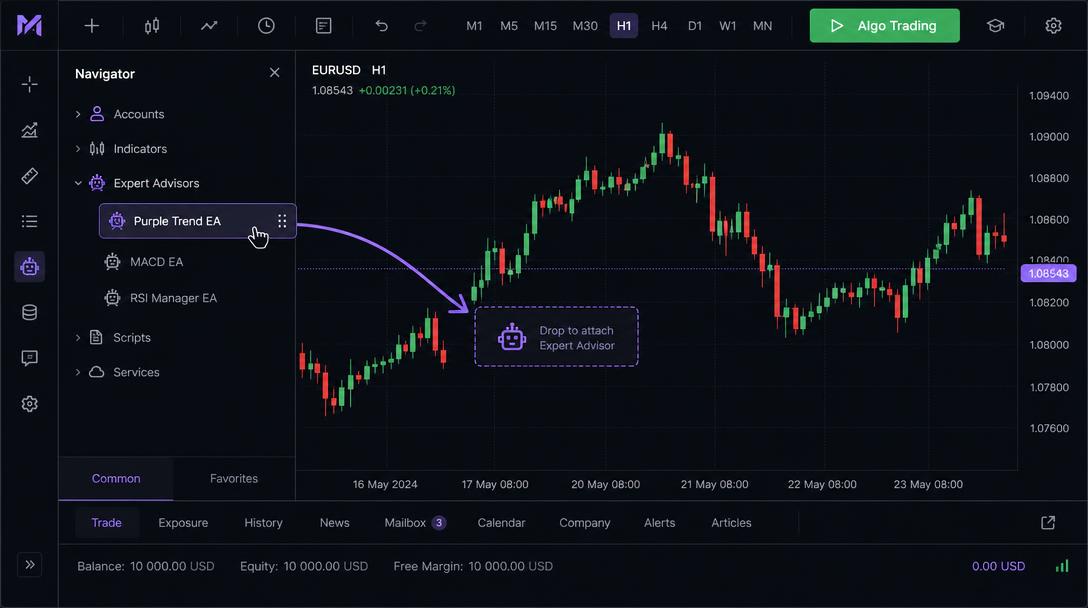
Worked if: A smiley face appears in the top-right of the chart and the Experts tab prints a TradeMirror start line.
7.Check it is arriving
Open a demo position or move a stop. Within a few seconds the connection check below turns green, Connections shows the event count rising and the Today page starts filling in.
Worked if: Heartbeat seen in the last minute and at least one event recorded.
Test this connection
Sign in and open this walkthrough from an account on the Connections page to watch data arrive in real time.
What a recorded trade looks like
Once the connection is live, a managed trade arrives as a sequence like this. The middle two rows are the point of the platform: without them there is a result but no record of how it was managed.
- 09:31:04Position openedLong 1.0 EURUSD at 1.0850, stop 1.0820, target 1.0930.
- 09:41:22Stop movedStop raised from 1.0820 to 1.0850 — recorded as a stop_modified event, not inferred.
- 10:02:47Partial close0.5 closed at 1.0889; 0.5 still open. Both the size before and after are stored.
- 10:26:10Position closedRemaining 0.5 closed at 1.0902, short of the 1.0930 target.
This is an illustrative example, not your data and not a suggestion about how to manage a position.
If something goes wrong
The Experts log shows WebRequest failed with error 4014 or 5203.
The address is not on the allowed list, or Algo Trading is off. Re-check Tools → Options → Expert Advisors and that the address matches exactly, with no trailing slash.
I closed my laptop for an hour.
Nothing can be recorded while the connection is down. A heartbeat is sent every 30 seconds, so a gap is shown as a gap rather than filled in with a guess.
Can it trade for me?
No. The recorder only reads the terminal's state and posts it. It contains no order-sending code at all.
Platform disclaimer
TradeMirror is a trade-recording, behavioural analytics and educational self-review tool. It does not provide investment advice, personal recommendations, trading signals, portfolio management or trade execution. Insights are based on historical activity and hypothetical scenarios and should not be treated as recommendations to buy, sell, hold or modify any financial instrument. Trading involves substantial risk. Past performance and simulated results do not guarantee future outcomes.
TradeMirror never places, modifies or closes an order. Every connection above is read-only.